
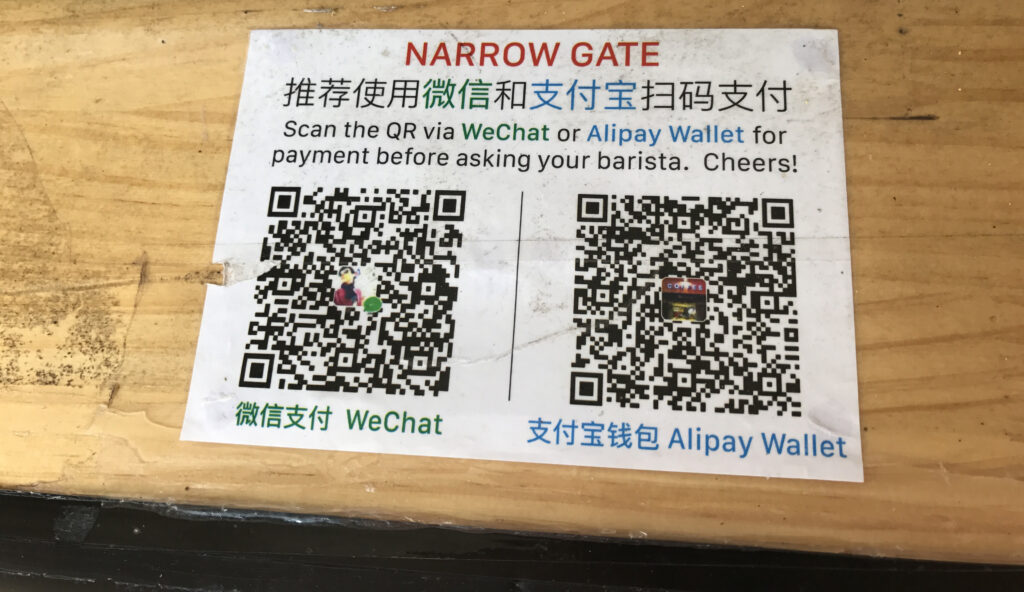
China is the most app-dependent travel destination on earth. You will pay with an app, navigate with an app, order food with an app, and hail a car with an app. Cash still works, but it is the backup, not the default. The good news is that ten apps cover almost everything a first-timer needs — and nearly all of them can be set up from your sofa before you fly. Do that, and your first day in China feels easy.
This guide covers the apps that actually matter in 2026, what each one does, and the order to set them up in. If you only have twenty minutes before departure, read the checklist at the end.
Two rules before you download anything
Set everything up before you land. Several of these apps need a text message to your home number, a passport scan, or a face check. All of that is far easier on your own Wi-Fi than on airport Wi-Fi with a tired brain. Some Western app stores also become hard to reach once you are on a mainland connection, so download first, verify second, fly third.
Sort out mobile data before the apps. Every app on this list is useless without a working connection on arrival. An eSIM or a travel SIM arranged in advance is the simplest route — our guide to staying connected in China walks through the options, including which one to pick if your phone is locked to a carrier.
The five apps that run your trip
1. Alipay — your wallet
Alipay is the single most important app on this list. It pays for street food, metro tickets, museum entry, taxis and hotel extras, and its mini-programs handle everything from bike hire to attraction tickets. Foreign visitors can sign up with an overseas phone number, verify with their passport, and link a Visa or Mastercard — no Chinese bank account needed.
Do the setup at home: link your card, complete the passport check, and make one small test payment if the app lets you. Everyday payments under ¥200 are fee-free; larger single payments carry caps and a small fee, so check the limits in the app before you pay for something big like a hotel bill. If a card is rejected, try a second card before assuming the app is broken — banks block first payments from China surprisingly often. The full detail is in our guide to paying in China as a foreigner.
2. WeChat — messaging, menus and backup payments
WeChat is China’s messaging app, and it is also your backup wallet. Restaurants put their menus behind WeChat QR codes, hotels and drivers message you on it, and small shops that only take WeChat Pay will leave you stuck if it is not working.
Register at least three to five days before departure. New accounts sometimes need extra verification, and a friend who already uses WeChat may be asked to confirm you. Link a card and verify your passport the same way as Alipay, and keep WeChat as your second payment method rather than your only one.
3. Amap (Gaode Maps) — navigation
Forget Google Maps. On a mainland connection it shows stale, offset maps with no reliable transit directions and thin listings for local businesses. Amap is what China actually runs on: accurate walking, metro and bus routes, live traffic, and the correct location for the restaurant you are standing outside.
Switch the interface to English in settings — it now supports 16 languages — and download offline maps for the cities you are visiting. Search works in English for major sights and hotels, though smaller places may only appear in Chinese characters; when that happens, copy the Chinese name from your booking confirmation and paste it in.
4. DiDi — ride-hailing
DiDi is China’s Uber, operating in more than 400 cities, with a full English interface. Type your destination, see the price before you confirm, and pay through Alipay or a linked card. The in-app chat with your driver auto-translates, which removes the hardest part of taking a taxi in a country where you do not speak the language.
Two practical notes: drivers occasionally call rather than message, so keep your phone’s ringer on for the first few minutes after booking.
5. Trip.com — trains, hotels and flights in English
Trip.com is the international version of Ctrip, China’s largest travel booking platform, and it is the easiest way for a foreigner to book high-speed trains, hotels and domestic flights in English. Register and enter your passport details before you travel — for trains, your passport is your ticket, and you board by scanning it at the gate.
Train tickets go on sale 15 days before departure, and popular routes sell out, so book early. Expect a small booking fee, usually ¥20–40 per ticket. Our high-speed rail guide explains the booking window and seat classes in detail, and our hotel booking guide covers the one thing Trip.com cannot fix: some cheaper hotels are not licensed to host foreign guests, so always filter for foreigner-friendly properties.
The next five, for a smoother trip
6. Baidu Translate — translation that works offline
You will point your phone camera at menus, signs and ingredient lists every day. Baidu Translate handles camera and text translation and, crucially, works with an offline Chinese pack downloaded in advance. Google Translate is not reliably reachable on a mainland connection, so do not build your trip around it. Download the offline pack before you fly, and test it on a photo of a Chinese menu at home.
7. Meituan — food delivery and restaurant discovery
Meituan does food delivery and restaurant listings, and it has an English interface built in. It is the app for the nights you do not want to go out: order from the hotel room, pay in the app, and meet the courier at the lobby. Our China food guide covers how to order and what to expect at the table.
8. MetroMan — offline metro maps
Amap covers metro routing well, but MetroMan is worth having as a dedicated backup: clean, offline metro maps for every major Chinese city, in English. Pair it with our guide to using the metro, which explains fares, the QR-code entry system and the security checks.
9. 12306 — the official railway booking site
12306 is the national railway’s own booking platform, and its website has an English version — you only need a passport and an email address to register. The app itself is largely Chinese-only, so treat the website as a backup to Trip.com: useful when Trip.com shows no seats, because 12306 sometimes releases them at slightly different times. It charges no booking fee, which also makes it the cheapest way to book once you are confident with the interface.
10. Your VPN, set up before departure
Google, WhatsApp, Instagram, Facebook and many Western news sites are not reachable on a mainland connection without a VPN. If you need any of them during your trip, install and test your VPN before you leave — installing one after arrival is difficult. For the apps on this list, you do not need a VPN at all, which is exactly why they come first.
The 20-minute pre-departure checklist
Work through this the evening before you fly:
- Alipay: registered, passport verified, card linked, one test payment made if possible.
- WeChat: registered, passport verified, card linked.
- Amap: installed, English switched on, offline maps downloaded for your cities.
- DiDi: installed, card linked or Alipay connected.
- Trip.com: registered, passport details entered, trains and first hotel booked.
- Baidu Translate: installed, offline Chinese pack downloaded.
- Meituan and MetroMan: installed and set to English.
- VPN: installed and tested, if you need one.
- Phone: roaming off or eSIM active, and your home number able to receive texts for verification codes.
If an app refuses to work
It happens, usually at the worst moment. Work through this order: switch between Wi-Fi and mobile data; force-close and reopen the app; try your second card; try your second payment app. Face-verification failures are common in poor light — step outside or into brighter light and try again. If Alipay will not verify at all, WeChat Pay often will, and vice versa.
Keep some cash as a fallback — ¥500 in small notes covers a day of taxis and snacks in most cities — and remember that hotel front desks are used to helping foreign guests with exactly these problems. Our step-by-step trip-planning timeline puts the app setup in the right week so it never becomes a last-minute panic.
What you do not need
Resist the urge to install everything. You do not need Baidu Maps as well as Amap, Ctrip as well as Trip.com, or three translation apps. Ten apps, set up properly, is the whole system — the rest of your phone’s storage is better spent on photos.
China rewards travellers who arrive prepared and punishes those who improvise the basics at the airport. Download these apps, verify them at home, and the country opens up: you will pay like a local, navigate like a local, and eat like a local from your first morning. And if you would rather have someone else handle the fiddly parts of the plan — the route, the bookings, the timings — that is exactly what our travel concierge does. Want the apps, the route and the bookings sorted for your exact dates? Our Route Design ($180) turns your trip into a day-by-day plan, with all of this already built in.